

Using FoxSell with a 3PL
Yes—FoxSell works with 3PLs
FoxSell Bundles Plus is compatible with 3PL (3rd Party Logistics) workflows because your bundle purchase is fulfilled as individual product SKUs in Shopify—so your warehouse/3PL can pick, pack, and ship the actual items.
How fulfillment looks in Shopify
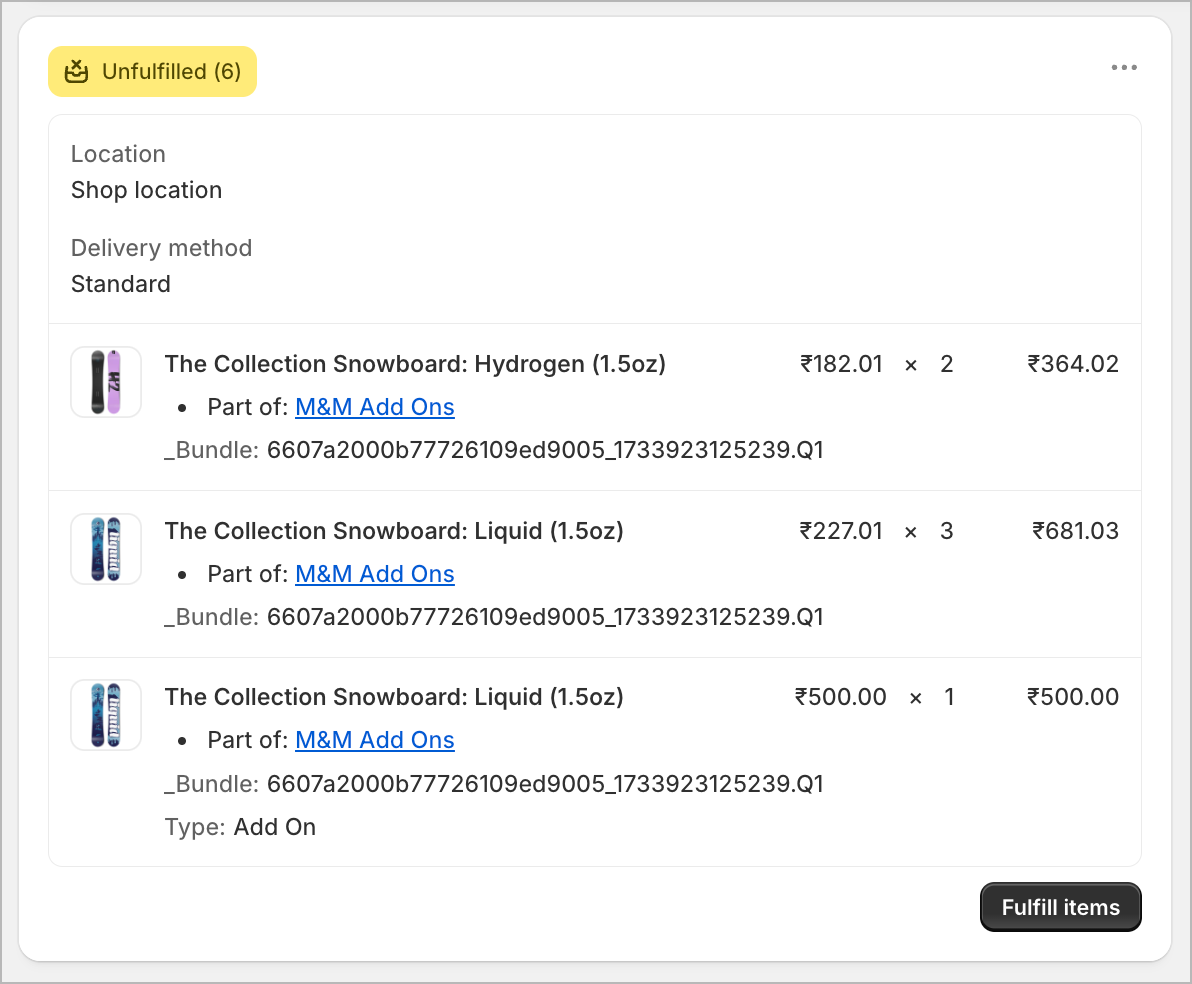
When a customer buys a Mix & Match bundle, Shopify shows the bundle contents as separate line items. FoxSell also adds identifiers on each item to make it obvious which items were purchased together as one bundle.
Bundle breakdown (individual SKUs)
Instead of sending a single “bundle SKU” to fulfillment, the order contains the component items (the SKUs your 3PL actually stocks). This gives your 3PL full visibility into what to ship.
Bundle tracking with “Part of” and “_Bundle”
Each component line item includes two helpful markers in the order:
- Part of: shows the bundle group the item belongs to (for example,
M&M Add Ons). - _Bundle: a bundle identifier that’s the same across all items from the same bundle purchase—so you (and your 3PL) can tell those items should be packed together.
What this means for your 3PL
- Picking: Your 3PL picks standard SKUs (the actual items), not a virtual bundle-only SKU.
- Packing: The shared
_Bundleidentifier helps group items that should be packed as one set. - Fewer fulfillment mistakes: Items from different bundles (or add-ons) are easier to separate and verify.
Recommended setup for smoother fulfillment
- Keep SKUs consistent: Make sure every product used in bundles has the correct SKU your 3PL expects.
- Train your ops team on the labels: In Shopify orders, look for Part of and _Bundle when checking bundle shipments.
_Bundle identifier. In that case, ask them to enable importing line-item properties/attributes from Shopify (wording varies by 3PL system).Need help?
If you’d like us to sanity-check a sample order and confirm what your 3PL should see, contact [email protected].